


When labor starts to feel close, the hardest part is often not pressing a button; it is deciding what the pattern means while tired, uncomfortable, and distracted. Contraction Timer & Counter 9m is built for that narrow but important moment. I found its appeal in the simple idea of turning each contraction into a timed entry, then using the resulting pattern to support a calmer conversation with a midwife, doctor, or birth partner.
This is a free parenting app from Neiman, rated for Everyone, and it runs on Android devices using version 6.0 or later. Its current version is 2.1, and the app has passed the five-million-install mark. Those figures suggest that it is not an obscure experiment, but popularity should not be confused with medical authority. I see it as a practical tracking aid, not a diagnostic tool or a replacement for professional advice.
How the current experience works in real life
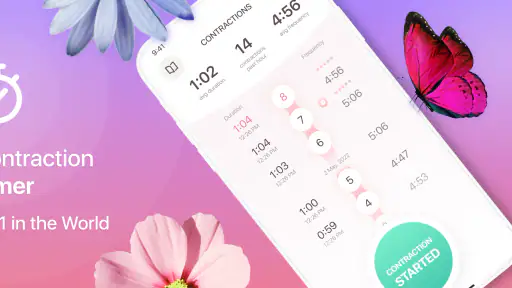
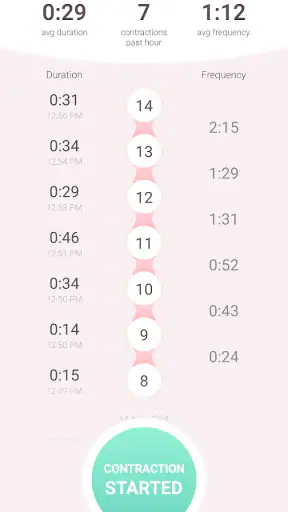
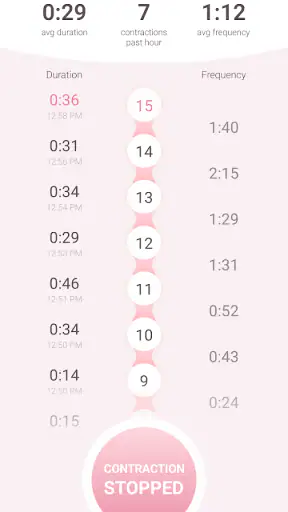
The basic workflow is easy to understand: start timing when a contraction begins, stop when it ends, and repeat for the next one. The useful information comes from the spaces between those actions. Rather than relying on memory, I can look back at a sequence and discuss duration and frequency with someone providing care.
That simplicity matters during early labor. A complicated pregnancy app can become frustrating when every screen asks for extra details. A dedicated contraction timer has a clearer purpose, so I would be more likely to hand the phone to a partner and let that person handle the recording while I concentrate on breathing and comfort.
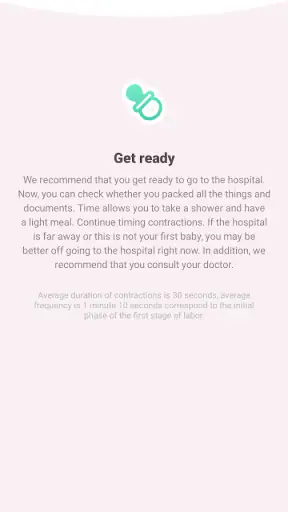
A realistic use case is a late-night period when contractions are noticeable but not yet obviously regular. One person can operate the phone, while the other rests between contractions. After several entries, the pattern is easier to describe than “they seem closer together.” The app does not make the decision about when to call; it gives the conversation a more reliable starting point.
I also like the psychological benefit of having a record. Labor can make time feel distorted. A timer provides an external reference, which may reduce the temptation to guess whether a contraction lasted longer or whether the previous one was actually recent. That is a small feature in technical terms, but a meaningful advantage in an emotionally intense situation.
What makes the focused design useful
Compared with a stopwatch, this app is more appropriate because it is organized around contractions rather than general elapsed time. A stopwatch can record one interval, but it leaves the user to remember each result, calculate gaps, and organize the sequence. A notes app offers flexibility, yet typing while uncomfortable is not a pleasant workflow. A general pregnancy tracker may contain much more information than is needed at that exact moment.
The focused approach also makes it easier for a support person to take over. Before labor, I would show the partner where timing starts and ends, then agree on a simple routine. The person in labor does not need to explain the whole app during every contraction. This is one of the less obvious strengths of a specialized tool: it can divide the job between the person experiencing symptoms and the person observing the clock.
There is a trade-off, though. A narrow app is not automatically the best choice for someone who wants prenatal education, appointment planning, kick tracking, medication reminders, or a broader health journal. Contraction Timer & Counter 9m makes more sense as a focused utility kept ready for a particular stage, not as a complete pregnancy companion.
What the version information tells me
The app was released on August 14, 2018, and the current version is 2.1. I would interpret that history carefully. It shows that the product has been around long enough to move beyond its first release, but the version number alone does not tell me how extensive each change was. I would not promise that a particular update transformed the interface or added a specific tool unless the app itself clearly showed it.
For an existing user, the practical question is whether the current build still feels dependable for the central task. In my view, a contraction timer does not need constant visual novelty. Stability, quick access, readable controls, and a clear record matter more than a long list of additions. The evolution of a utility like this should be judged by whether it reduces friction at the moment it is needed.
New users should still spend a few minutes testing the current version before labor begins. Open it, identify the control used to begin timing, identify the control used to finish, and make sure the result is understandable. A rehearsal removes the worst kind of uncertainty: discovering the interface for the first time during a painful contraction.
Because the app is free, trying it ahead of time is straightforward. There are in-app purchases priced at $0.99 per item, so I would check what is available before relying on any optional element. The core decision is not whether a small purchase is expensive; it is whether the free experience already covers the timing workflow you actually need.
How I would prepare it before labor
I would install it well before the due date, open it in the room where the phone is normally charged, and practice with a few imaginary contractions. This is more useful than merely downloading it. The goal is to know whether the buttons are easy to reach, whether the display is readable in dim light, and whether a partner can operate it without asking repeated questions.
I would also keep the phone charged and avoid treating the app as the only record of what is happening. A partner can write down notable changes if needed, and important concerns should be communicated directly to a healthcare professional. The timer can support that communication, but it should never delay a call when symptoms or instructions make immediate contact appropriate.
One practical technique is to assign one person to timing and another to noticing the broader situation. The timer user can focus on starting and stopping accurately, while the other person pays attention to comfort, hydration, transport plans, and any guidance already given by the care team. This prevents the phone from becoming the center of the entire experience.
I would avoid tapping too early just because discomfort is beginning, and I would use the same start-and-stop habit each time. Consistency is more valuable than trying to create a perfect scientific measurement at home. If the pattern looks unusual, changes suddenly, or worries you, the right next step is professional guidance rather than repeatedly checking the screen.
Where it fits among the usual alternatives
The closest alternative is probably the phone’s built-in stopwatch. That option costs nothing and requires no dedicated installation, but it is awkward for a sequence of contractions. The user has to preserve each result somehow, and the meaning of the numbers is less visible. This app earns its place by reducing that organizational work.
A notes app sits at the opposite end. It can include comments such as position, pain, fluid changes, or what a care provider advised, which may be valuable for someone keeping a detailed journal. However, notes demand more manual input. During labor, that flexibility can become friction, especially when the person recording is also providing support.
A full pregnancy application may be better for someone who wants one place for education and many kinds of tracking. Its disadvantage is focus: a crowded dashboard can make a simple timing task harder to reach. I would choose this dedicated app when the immediate need is contraction intervals, and a broader app when the user wants an all-purpose pregnancy organizer.
There is also the option of using no app at all and following a clinician’s instructions with a clock. That remains perfectly reasonable. The value here is convenience and a clearer running record, not a requirement. Someone who dislikes phone use during labor, has a partner comfortable with manual timing, or has been given a different monitoring plan may be better served by that simpler approach.
Limitations I would take seriously
The first limitation is that timing alone cannot interpret labor. Regularity can be useful information, but it does not capture every relevant symptom or individual circumstance. The app should not be used to decide that medical help is unnecessary, and it should not override instructions from a maternity team.
The second is dependence on a phone. A low battery, a misplaced device, or a partner who is too stressed to operate it can interrupt the workflow. I would treat it as one helpful tool rather than the sole plan. A charger, a second person familiar with the process, and a clear contact plan are more important than any timer interface.
The third is that a focused timer may feel too bare for users who expect extensive notes or broader pregnancy records. If your main goal is documenting every symptom, appointment, and question, you may prefer a more comprehensive health app. The dedicated design is a strength when speed matters, but a weakness when context matters more.
There is also the question of optional purchases. Since the app is free to download but includes items priced at $0.99 each, I would not assume every convenience is included in the basic experience. I would explore those choices calmly before labor, not in the middle of it. That simple check prevents an unexpected interruption at the wrong time.
Who should use it, and who should skip it
I would recommend it to an expectant parent who wants a straightforward way to record contractions, especially when a partner or support person can handle the phone. It is also a sensible choice for someone who finds mental arithmetic stressful and wants a dedicated screen instead of a stopwatch and a notebook.
It may suit people who prefer a small, purpose-built utility over a large pregnancy platform. The Everyone rating makes it broadly accessible as an app, although the situation in which it is used is naturally connected to pregnancy and labor. The important qualification is that accessibility does not make it medical advice.
I would skip it if you want a comprehensive pregnancy diary, extensive educational content, or a tool designed around many types of health records. I would also skip relying on it if your care team has instructed you to monitor something different or to contact them based on symptoms rather than timing. In those cases, a timer can be secondary at most.
What I would watch as the app continues to evolve
For future changes, I would look for improvements that protect the core experience rather than adding clutter. Faster access, clearer timing feedback, dependable history, and an interface that remains easy to use with one hand would be meaningful progress. These are the details that matter when attention is limited.
I would also value careful handling of optional features. Any addition should make the record easier to understand without encouraging users to treat the app as a clinical authority. The best evolution would preserve the simple workflow while making it easier for a support person to read and communicate the pattern.
Existing users do not need to chase every update simply because the version number changes. They should open the app after an update and confirm that the timing controls and displayed record still behave as expected. New users should perform the same quick test before depending on it. That habit separates sensible preparation from blind trust.
After using it as a focused labor aid, my opinion is positive but measured. Neiman has made a free parenting app that addresses one specific problem without forcing the user into a large pregnancy-management system. Its rating of 4.8 from around eighty-nine thousand ratings and its reach of more than five million installs show strong adoption, but my recommendation rests more on the practical workflow than on popularity.
My main recommendation is to prepare it before labor, use it as a record rather than a diagnosis, and keep professional guidance in charge. If you want quick contraction timing and a support person can help operate the phone, it is a useful option. If you need a complete pregnancy journal or a substitute for medical advice, choose a broader solution and keep this kind of timer, if at all, in a supporting role.


